Connect your courier: Yalidine or Abex Express
laghazel doesn’t deliver: you connect your own account with the courier. Your customers see the real price for their commune, and the parcel is created with the courier when you confirm the order.
Before you start
- A business account with Yalidine or Abex Express, with its API keys (ask your courier for them).
Choose the courier
In Réglages › Livraison (Settings › Delivery), the couriers offered by laghazel are listed. On yours, click Connecter (Connect).
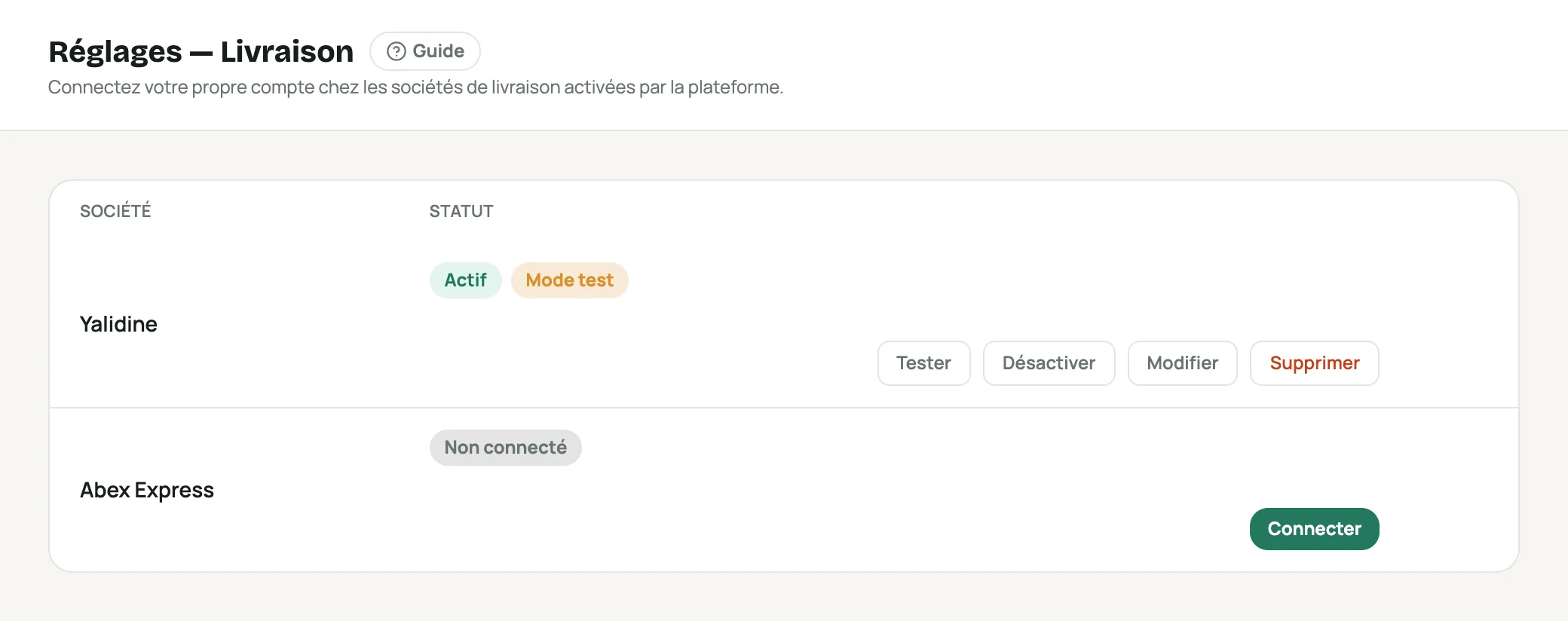
Réglages › Livraison with Yalidine connected in test mode and Abex Express ready to connect Paste your keys
You’ll be asked for your laghazel password to save the keys.
Courier Fields asked for Yalidine « API ID » and « API Token » Abex Express « Clé (key) » (Key) and « Token » Start in test mode
« Mode test (recommandé au départ) » (Test mode, recommended at first) is ticked by default. In test mode, nothing is sent to the courier: the prices shown to customers are fake, and so are the parcels. Handy for trying out the whole store.
When everything is ready, untick test mode (Modifier (Edit)): real prices and real parcels begin.
Don’t forget to turn off test mode before your real orders: otherwise no parcel is created with the courier.
Test and activate
Tester (Test) checks your keys with the courier. Activer / Désactiver (Activate / Deactivate) offers or withdraws this courier to your customers without deleting the keys.
What the customer sees
When ordering, the customer picks their wilaya and commune, then “Home delivery” or “Pickup point (stop desk)”. The available couriers appear with their price; the cheapest is chosen by default. For home delivery, the address is required.
With your own rates, you choose what the customer sees: your prices or the courier’s (see Set your delivery prices).
Frequently asked questions
The parcel wasn’t created
Check that the courier is no longer in test mode and that Tester succeeds. If the courier refuses the parcel, the order stays « En attente » (Pending) and nothing is charged: try again after fixing it.
Who collects the money?
Your courier collects from the customer on delivery and pays the amount back to you under your contract with them.