Use your own domain
Your customers land on www.maboutique.dz, or on a subdomain like boutique.mondomaine.com, instead of maboutique.laghazel.com. It’s free: you add two records at your domain provider, and laghazel takes care of the rest, HTTPS certificate included.
Before you start
- A domain of your own, bought from a provider: Namecheap, GoDaddy, Cloudflare, or a registrar for .dz addresses.
- Access to its “DNS” (or “DNS zone”) settings.
Enter your domain
In Réglages › Domaine (Settings › Domain), type your domain, for example www.maboutique.dz, then Continuer (Continue).
Keep the “www”: it’s the most reliable address. The address without “www” will redirect to it.
Already using your domain for something else (your website, your email)? Use a subdomain, for example boutique.mondomaine.com: it’s kept as is, and the rest of your domain isn’t touched.
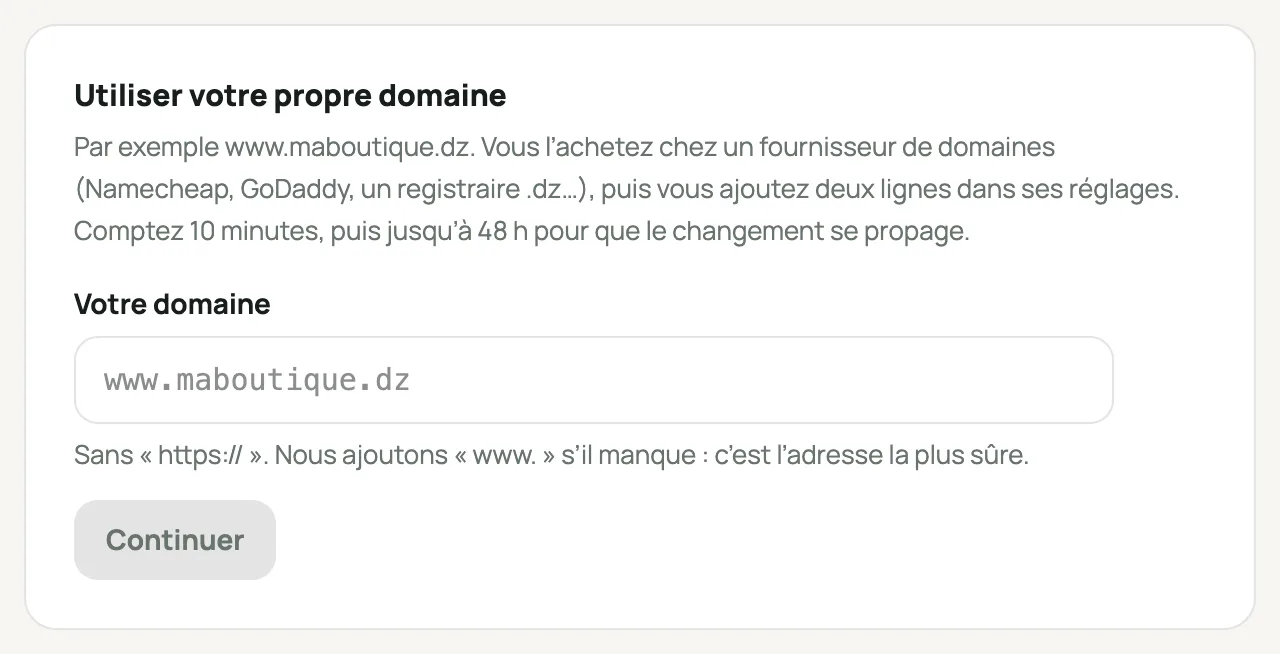
Réglages › Domaine, the “Votre domaine” (Your domain) field Add the records at your provider
laghazel shows you three records, with a button to copy each value. The TXT value is unique to your store.
- Namecheap: Domain List › “Manage” › “Advanced DNS” tab › “Add New Record”. First delete any “www” record that points to a parking page.
- GoDaddy: your domain › “DNS”. Edit the existing “www” CNAME record instead of adding a new one, and the “@” A record.
- Cloudflare: your domain › “DNS” › “Records” › “Add record”, with the cloud set to gray (“DNS only”).
- .dz registrar: its customer area, under “Zone DNS” or “Gestion DNS” (DNS management). No access? Send them the table from your Domaine page: they’ll add the records for you.
Type Name Value CNAME wwwstores.laghazel.comRequired TXT _laghazellaghazel-verif=…(on your Domaine page)Required A @the IP address shown on your Domaine page For the address without “www” On Cloudflare, the orange cloud blocks the HTTPS certificate from being created: keep it gray on these records.
With a subdomain, there are only two records and the names change. For boutique.mondomaine.com: a CNAME “boutique” pointing to stores.laghazel.com, and a TXT “_laghazel.boutique”. Your Domaine page shows the exact names.
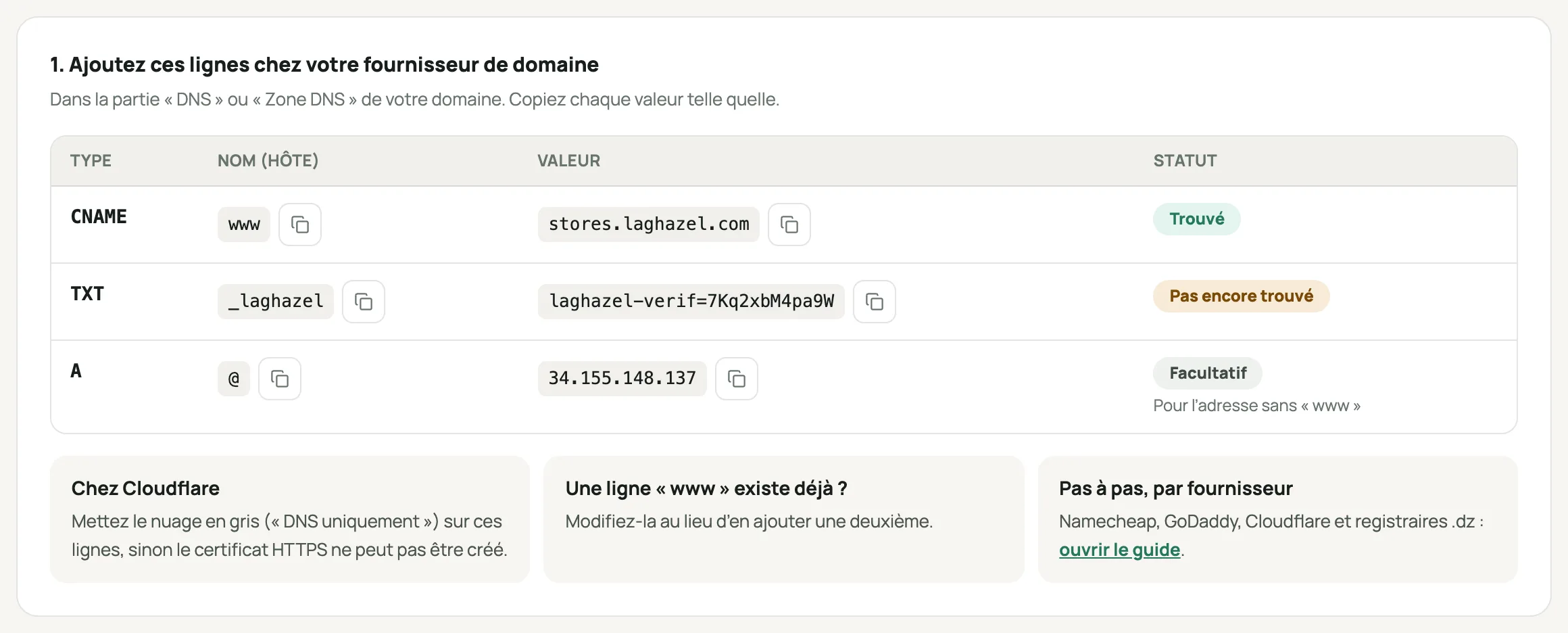
The three DNS records to add, with their status Verify
Go back to Réglages › Domaine and click Vérifier maintenant (Verify now). Each record switches to “Trouvé” (Found) once we can see it.
A DNS change often takes a few minutes, sometimes up to 48 h: we check again every 10 minutes for 7 days.
You get an email as soon as your domain is live.
You’re live
- Your store page, your SMS, your emails and Google all use your domain.
- maboutique.laghazel.com stays active and redirects to your domain, on the same page.
- The QR codes on your order sheets and cards go through the laghazel address: they keep working even if your domain expires one day.
- Don’t forget your store icon, shown in the browser tab.
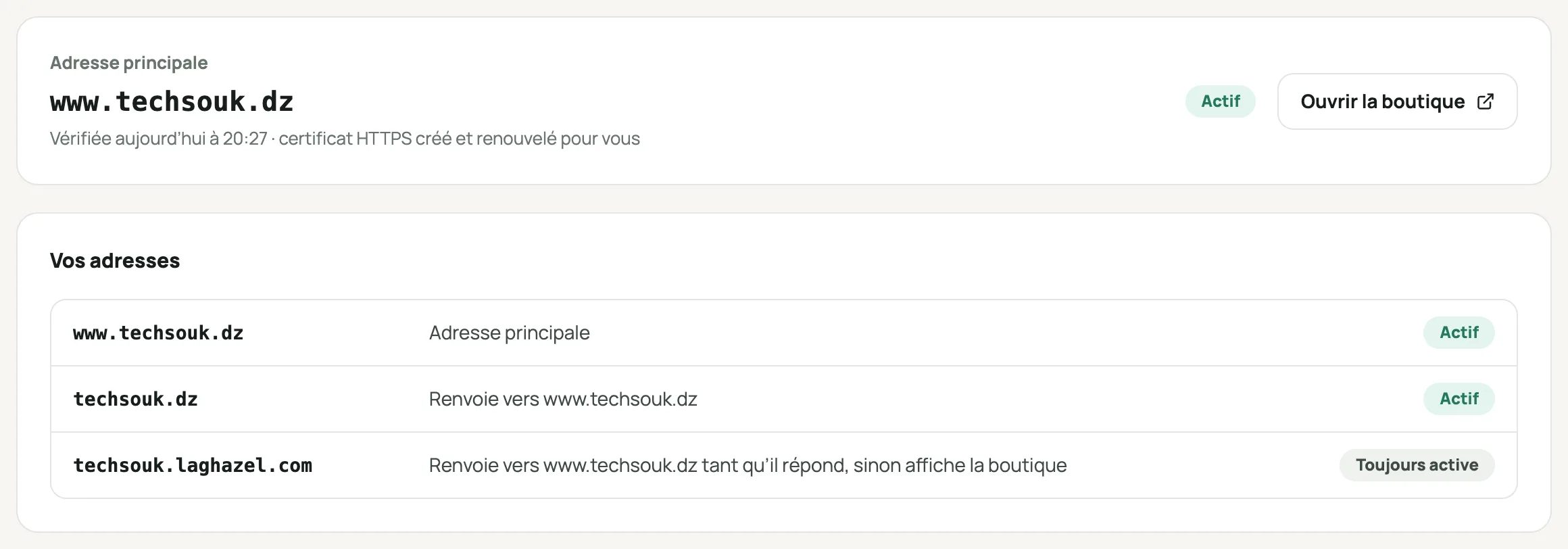
The active domain and the store’s addresses
Frequently asked questions
What happens if my domain expires?
We notice it at the daily check. Your customers are immediately sent to maboutique.laghazel.com, and so are your SMS and emails, and you get an email. Everything switches back to your domain as soon as it responds again.
Will my email addresses on this domain change?
No. Don’t touch the “MX” records: they’re used for your email. laghazel doesn’t create email addresses.
A “www” record already exists
Edit it instead of adding a second one: a domain can only have one “www” CNAME record.
The HTTPS certificate isn’t being created
Check that the cloud is gray on Cloudflare. If your domain has a “CAA” record, it must allow letsencrypt.org.
Can I go back to the laghazel address?
Yes, at any time: “Retirer le domaine” (Remove domain) in Réglages › Domaine. Your store switches back to maboutique.laghazel.com right away.
Will my customers have to log in again?
Just once: a customer logged in on the old address logs in again on the new one. Their account and orders stay the same.