Process an order, from « En attente » (Pending) to « Livrée » (Delivered)
Every order arrives « En attente » in Marché (Orders). You call the customer, log the result of each call, edit the order if they ask, then confirm it and move it forward until delivery.
Open the order
Marché lists your orders: code, customer (« invité », guest, if they ordered without an account), wilaya, commune, total, status, calls and date. Click an order to open it.
Three filters work as a call queue: À appeler (To call: new orders and callbacks that are due), Rappels dus (Callbacks due) and Sans réponse (No answer: 3 calls with no answer). They are sorted by what to do first.
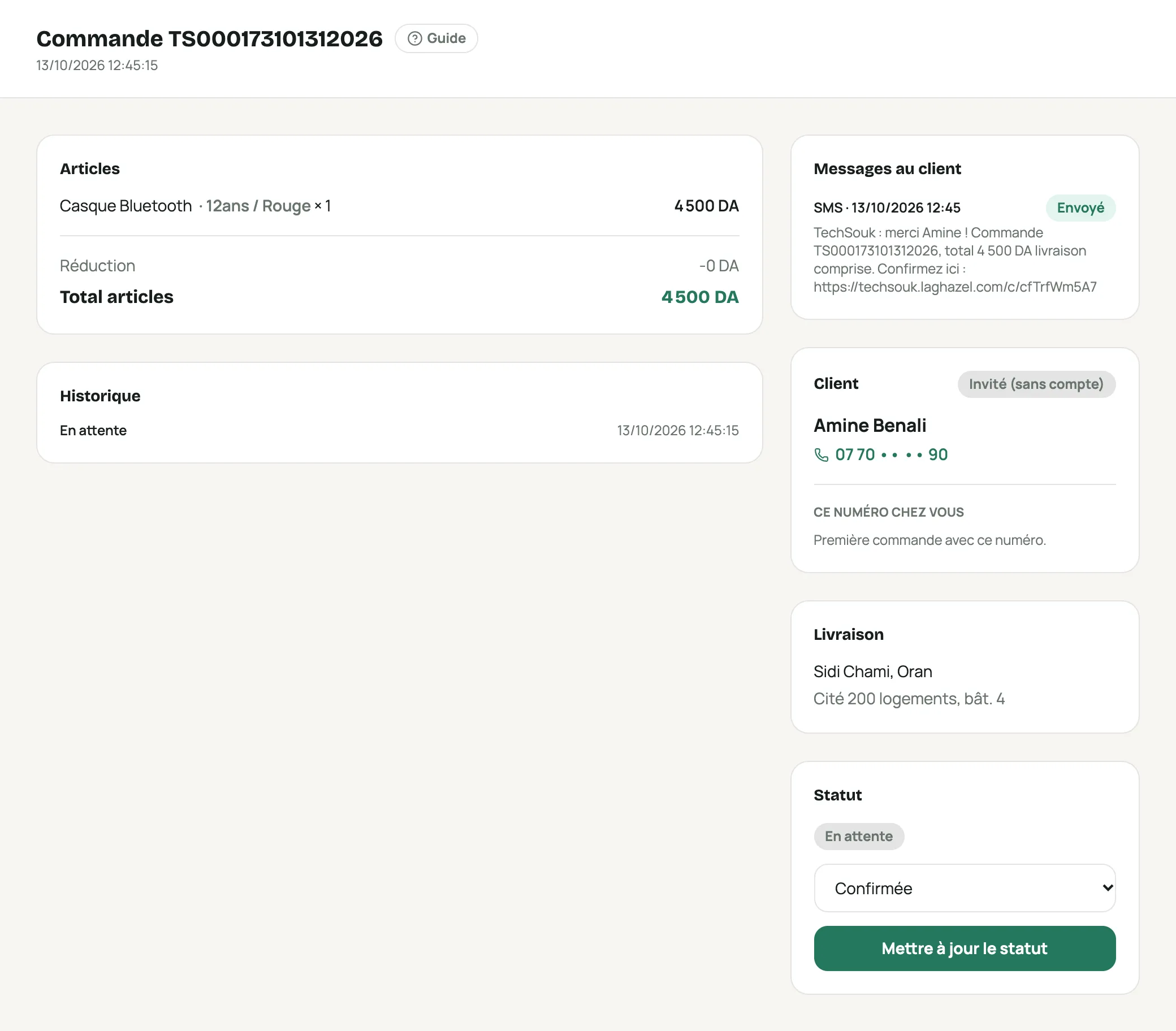
An order: items, history, customer messages, customer, delivery and status Check the customer before confirming
The Ce numéro chez vous (This number at your store) block shows the history of the same phone number in your store: delivered, returned, cancelled and ongoing orders. If there are cancellations or returns, call before shipping.
With confirmation SMS, customers can confirm themselves through a link: their answer appears in « Messages au client » (Customer messages).
Call and log the result
The Confirmation panel shows the number with Appeler (Call) and WhatsApp. After the call, pick the result: Le client confirme (Customer confirms), Pas de réponse (No answer), Occupé (Busy), Éteint / injoignable (Off / unreachable), Rappeler plus tard (Call back later, pick the time) or Le client annule… (Customer cancels…).
« Le client confirme » confirms the order, just like the « Confirmée » (Confirmed) status. Every call is kept with its time, the person who called and an optional note.
After 3 calls with no answer, the panel offers the « pas de réponse » (no answer) SMS: the customer gets the link to confirm or cancel in one click.
Team notes
Below the items, Notes de l’équipe (Team notes) keeps whatever you want to pass on (« livrer après 17 h », « veut la couleur noire »). They are never shown to the customer. The customer’s own note, written when ordering, appears above.
Edit the order during the call
Modifier la commande (Edit order) changes the option (size, color), the quantity, adds or removes a product, changes the wilaya, the commune, the address, home delivery or pickup point, the name and the second phone number.
Stock follows the change, offers and delivery are recalculated, and the history records what changed. Tick « Envoyer au client le nouveau total par SMS » (Send the customer the new total by SMS) if the total changes.
An order can be edited until it is handed to the courier. The customer’s main phone number can’t change: they use it to track their order.
Change the status
Under « Statut » (Status), choose the new status then click Mettre à jour le statut (Update status).
Status What it means En attente (Pending) Order received, not checked yet. Confirmée (Confirmed) The customer confirmed. The parcel is created with your courier. En préparation (Preparing) You are preparing the parcel. Prête pour ramassage (Ready for pickup) The parcel is waiting for the courier. En livraison (Out for delivery) The delivery driver is on the way. Livrée (Delivered) The customer received and paid. Annulée (Cancelled) The order won’t ship. The stock goes back on sale. A reason is required. Retournée (refusée) (Returned, refused) The customer refused the parcel. The stock goes back on sale. A cancelled or returned order is closed: its status can no longer change.
What confirming does
- If a courier is selected, the parcel is created with them using your account, and its tracking number appears under « Livraison » (Delivery). If the courier refuses, nothing changes: fix the issue and try again.
- The laghazel commission, if there is one, is deducted from your balance.
« Crédit épuisé » (Credit used up): your balance must be topped up by laghazel before you can confirm more orders. Write to us.
Frequently asked questions
Why give a cancellation reason?
Wrong number, duplicate, too expensive, delivery too expensive… The reason shows why you lose orders and helps spot fake ones. When the customer is the one cancelling, they don’t receive a « cancelled » SMS.
Who can confirm or cancel?
Confirm and move forward: roles with « Confirmer et faire avancer les commandes ». Cancel or mark as returned: roles with « Annuler et marquer retournée » (Cancel and mark as returned). See Invite your team.
The customer’s phone number is hidden
Your role doesn’t include « Voir le téléphone et l’adresse des clients » (See customers’ phone and address). Ask an Admin.